Suricata Language Server 1.3.0 is now available and it surfs on the concept of magic comment introduced in version 1.0.0 to add some game-changing features for the Suricata signature writer. In this release, we also introduce LSP-based syntax highlighting, so no external modules are necessary to get colors when writing signatures.
What is a “Magic Comment”
The "magic comment" for the Suricata Language Server (SLS) is a comment placed at the top of a Suricata rule file to instruct SLS as to which options to use when running Suricata or which transformation to perform on the rules file before the syntax checking and validation. This allows the language server to provide accurate hints and auto-completion specific to the targeted Suricata version.
In this blog, we introduce several powerful new “magic comment” elements that are recognized in SLS version 1.3.
Network Match and Performance Impact
There are two major objectives when writing a Suricata signature are:
- Match on the desired traffic pattern
- Limit the performance impact of the signature
Historically, this has involved an iterative process of running the rules against a test PCAP file and observing the logs to see if A) there is a match and B) evaluating the rule’s runtime performance. The rule writer is forced to iterate this process until she/he achieves the expected result.
This type of repetitive process really screams for automation.
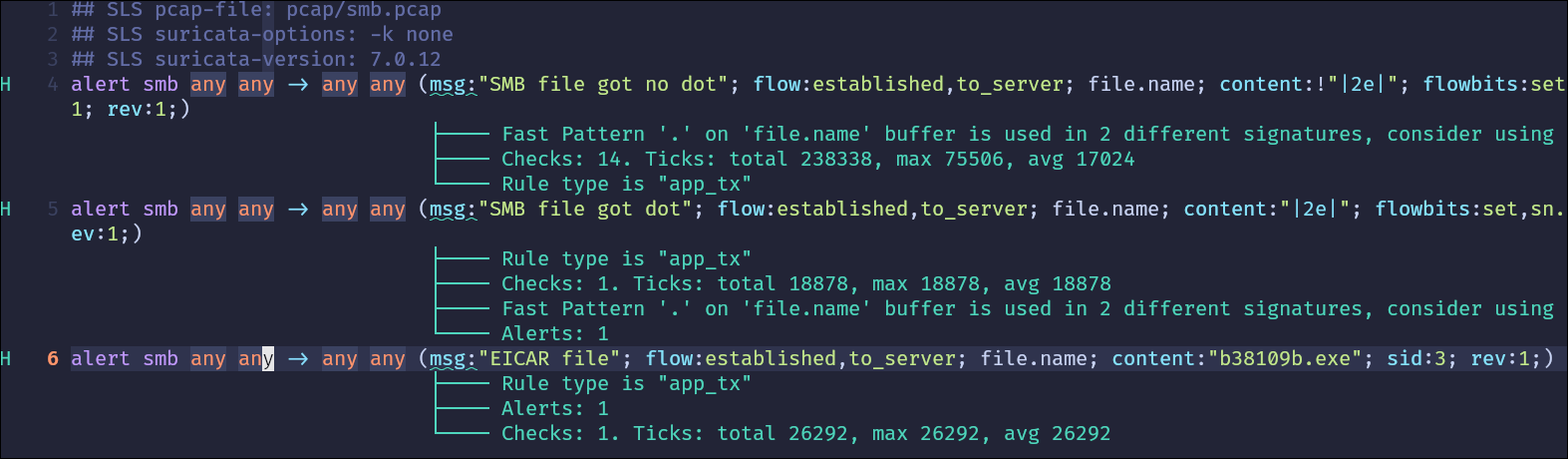
With SLS 1.3.0, we introduce a new option that allows users to specify a PCAP file to use for the test. At each evaluation, the PCAP is parsed and the number of hits for each signature is returned as a hint to the editor. If the Suricata instance is compiled with the rules profiling feature, then it will also output the number of checks on the signature as well as the number of CPU ticks it requires.
To do so, insert a comment to identify the PCAP file. See example below:

You can see this feature in action in the following video:
Suricata Version Support
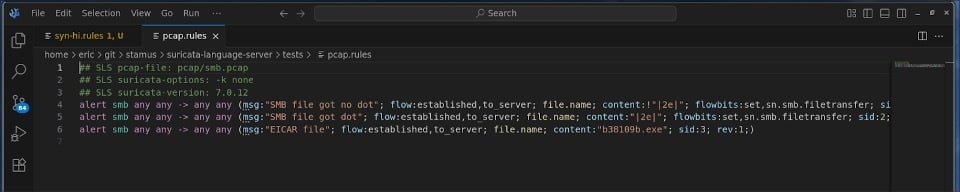
In some cases, the rule writer needs to write the signature for multiple versions of Suricata. If SLS is used with the container mode introduced in version 1.1.0, it is possible to specify which version of Suricata to use by using a comment. See example below:

Split editing is now supported, so it is possible to edit files for multiple versions of Suricata at the same time. You can see this feature in action in the following video:
Syntax Highlights
Suricata Language Server 1.3.0 also features syntax highlighting. It is now possible to get colors in editors without requiring the help of another module. This will be especially appealing for VScodium (https://vscodium.com/) users, as no syntax highlighting module is available in the marketplace. But it also provides up-to-date syntax highlights because the list of keywords is provided directly from the Suricata version used by SLS.
Summary
Suricata Language Server 1.3.0 represents a significant step forward in making signature development more accessible. By introducing these extensions to the “magic comment”, Suricata rule writers have powerful new capabilities to accelerate their development of accurate and performant Suricata signatures. Start using SLS 1.3.0 with your favorite LSP editor and Docker to immediately benefit from automated PCAP testing and seamless multi-version validation.
We're committed to making Suricata signature development smoother and more efficient for security practitioners everywhere. Download version 1.3.0 today and experience the difference PCAP testing makes in your workflow.
To download this latest version, please visit the SLS GitHub repository here>>
And to engage the open source community about this and other Suricata tools developed by Stamus Networks, please join the discussion on Discord here >>
Enjoy!